
Run your whole care center from one screen.
The Angelpaw Crematory/Aquamation Portal manages the full lifecycle of pet aftercare: order intake, pet tracking through your stations, cremation or aquamation, memorial packaging and return, with pricing, invoicing, routes and reports built in.
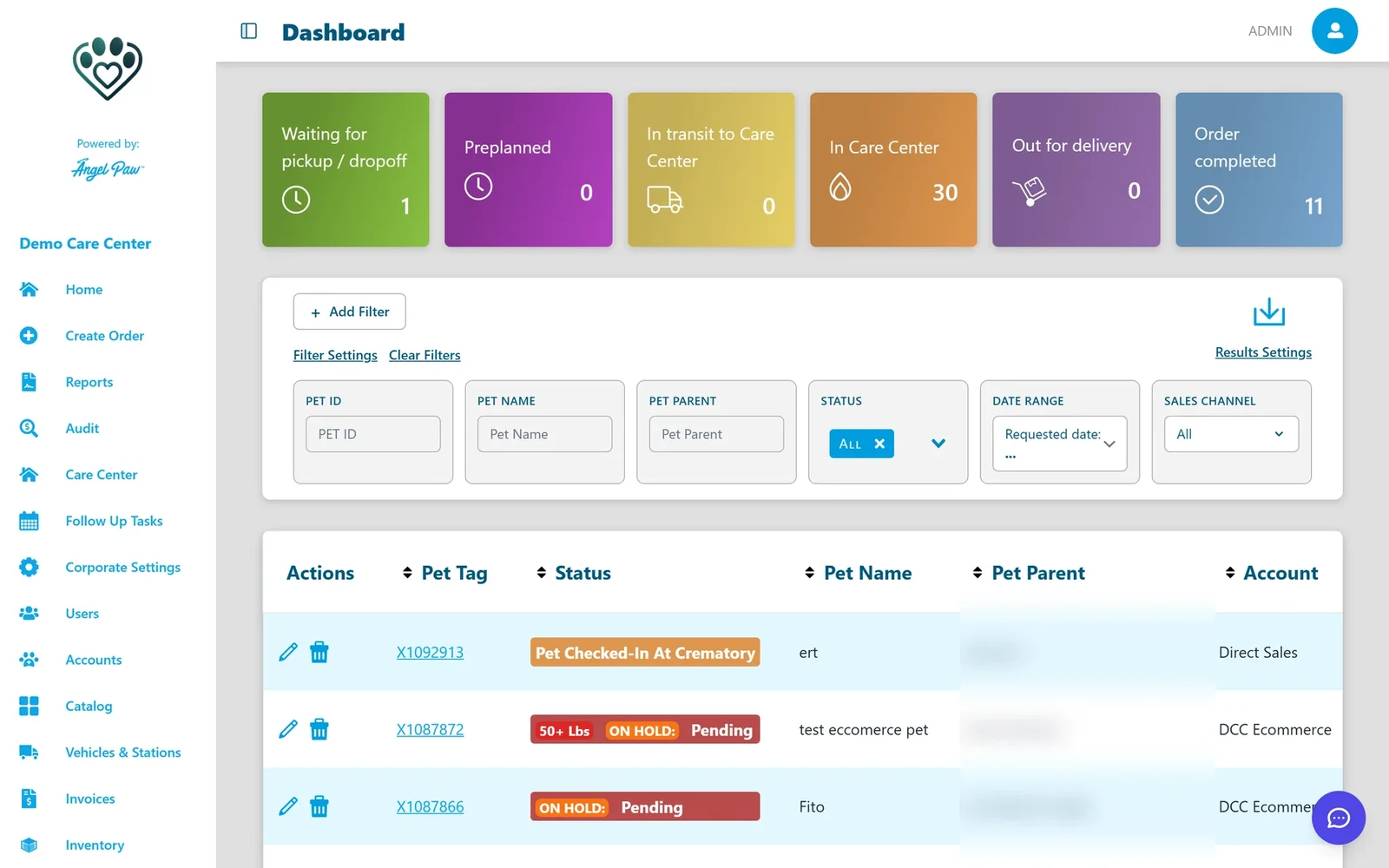
Real Angelpaw screens from a demo care center.
Your team, your vet partners and your families, connected.
Everyone works from the same orders, so nobody re-types anything and everybody sees the status they need.
Crematory admins and staff
- Manage accounts and pricing
- Process orders and track pets through stations
- Capture payments and manage invoices
Through the Veterinarian Portal
- Submit service requests for their clients
- View order status
- Receive and pay invoices
Online and in the Pet Parent App
- Place orders online
- Track their pet’s journey
- Receive notifications
The heart of day-to-day operations.
Intake, the floor, the audit trail and the orders list, all on the same record.
The heart of day-to-day operations.
Intake, the floor, the audit trail and the orders list, all on the same record.
Every order starts the same way
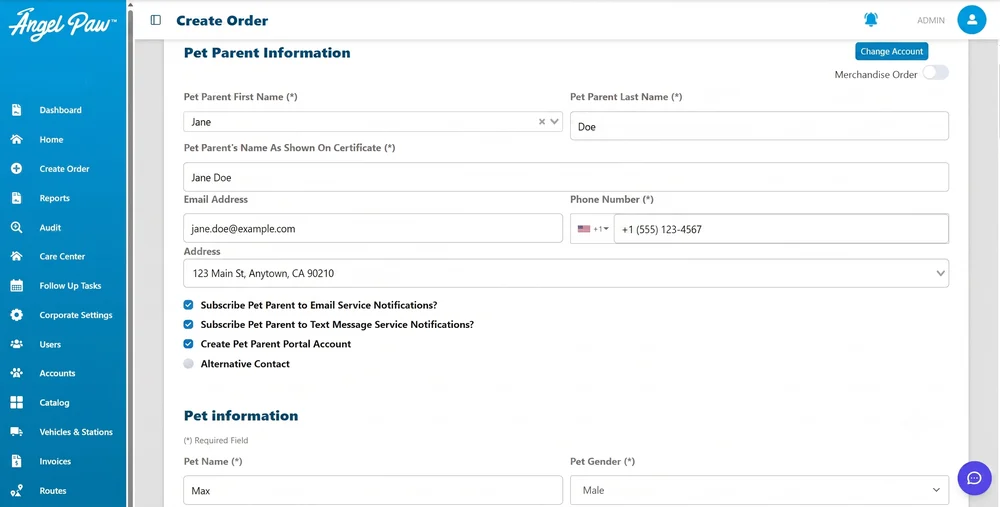
Staff, vet partners and pet parents all create orders with the same building blocks: pet parent, pet, package, additional items, pickup and return methods, and payment.
- Packages filtered by the pet’s weight
- Take payment now or capture it later
- A printable tag opens as soon as the order is created
Every pet, at every station
The Care Center Floor shows the stations a pet moves through. Scan or select a pet to see its special instructions, capture weight and move it to the next station.
- View by station, by status, or the classic layout
- Live View for a large monitor, cycling through all stations
- Move several pets together

A complete history for every pet
Each order keeps a station log: every move, who made it, when, and how long the pet spent at each station.
- Timestamp of each station transition
- Who moved the pet
- Location log with tracking evidence

Find any order in seconds
The Home screen lists every service request, with pet tag, pet name, account, service, status and location. Filter by status, date or account and download the results.
- Click the pet tag to open the order
- Filters by status, date range and account
- Exports for name plates and items
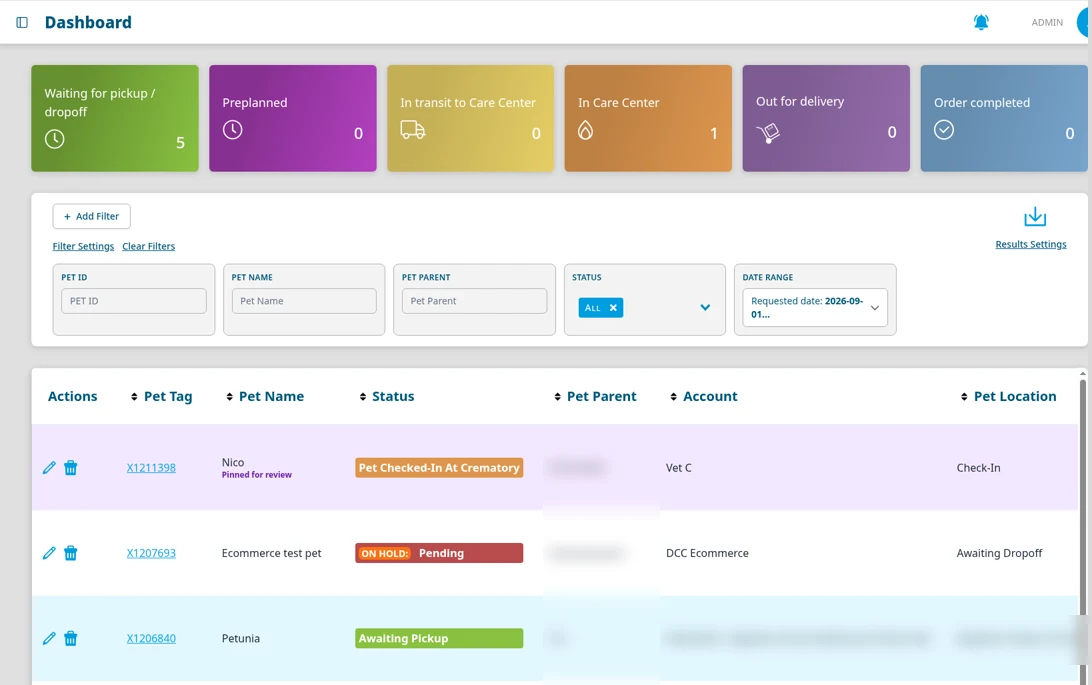
Real Angelpaw screens from a demo care center.
Every station, on the big screen.
Live View is a big-screen view for inside the crematory. Mount a TV or monitor on the wall and it cycles through every station automatically, so the whole team sees each pet’s status at a glance.
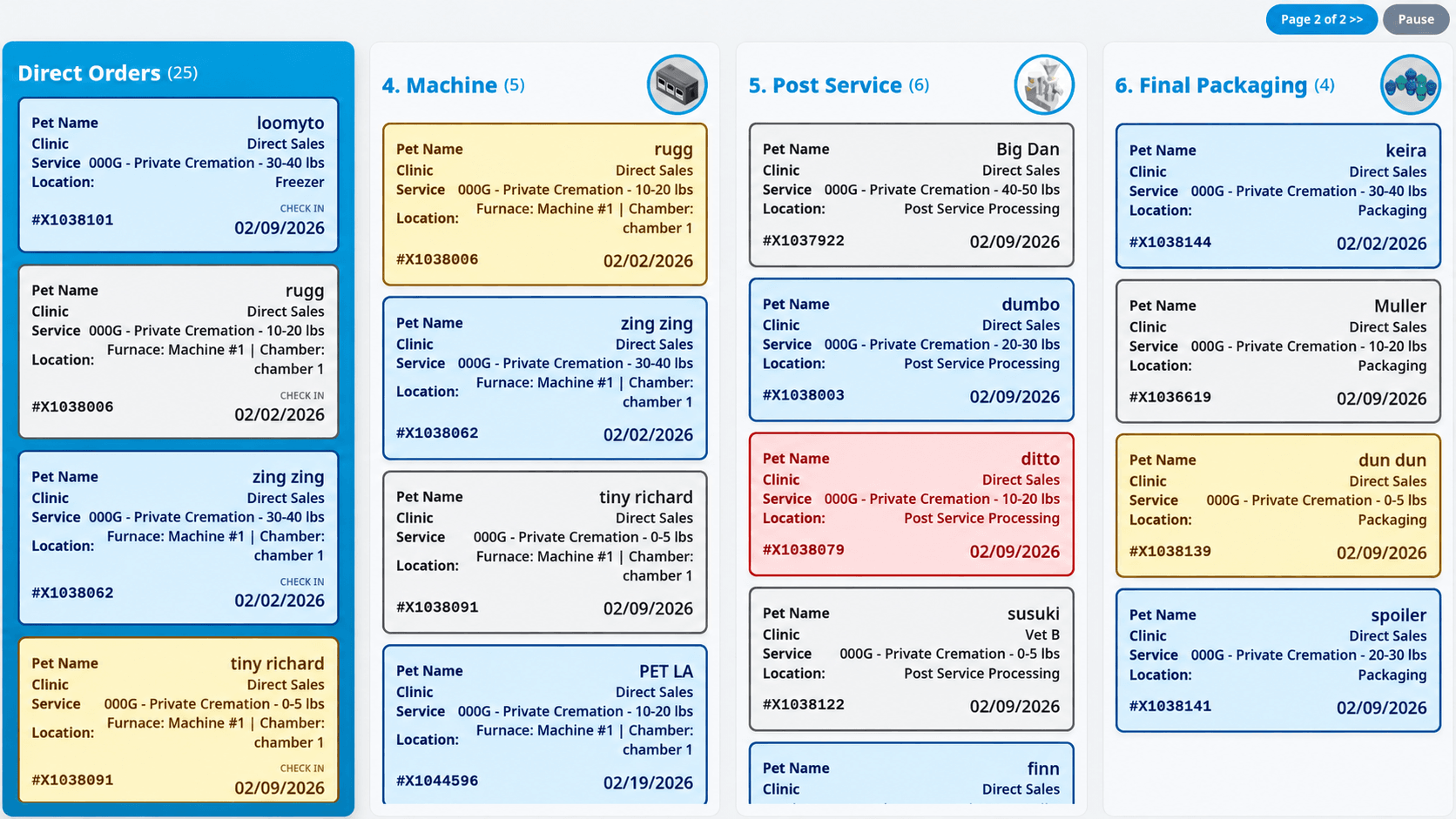
When there are more stations than fit on one screen, Live View splits them into pages and moves to the next one on its own. Pause holds the current page whenever you need it.
Each card shows the pet’s name, clinic, service, current location, pet tag and date, so staff can read the floor from across the room.
It is the same data as the Care Center Floor. Open it from the floor with one click and leave it running, no extra setup.
Real Live View screens from a demo care center. Your stations and their order follow your own setup.
A typical station flow.
Stations are configured per care center in Vehicles & Stations, so your names and order can differ.
Check-in
Confirm the weight and enter the metal tag, if your settings require it.
Special services
Paw prints, nose prints and fur clippings. Every item is scanned and turns green.
Cremation or aquamation
Assign the pet to a machine and section.
Post-service
Record the remains weight when required.
Packaging
Scan urns, certificates and keepsakes before the order can move on.
Staged for return
Pickup at the crematory, return to the vet or delivery to the family.
Different prices for every vet. Set up once.
Each account can have its own packages, item pricing, pickup and return methods and notifications. Vet partners that share pricing can be grouped, so you configure it once.
- Weight-bracketed, flat-fee or per-pound pricing
- Complimentary or upcharged urns, optional add-ons
- Account groups with per-account overrides
- Card fees and discounts per account
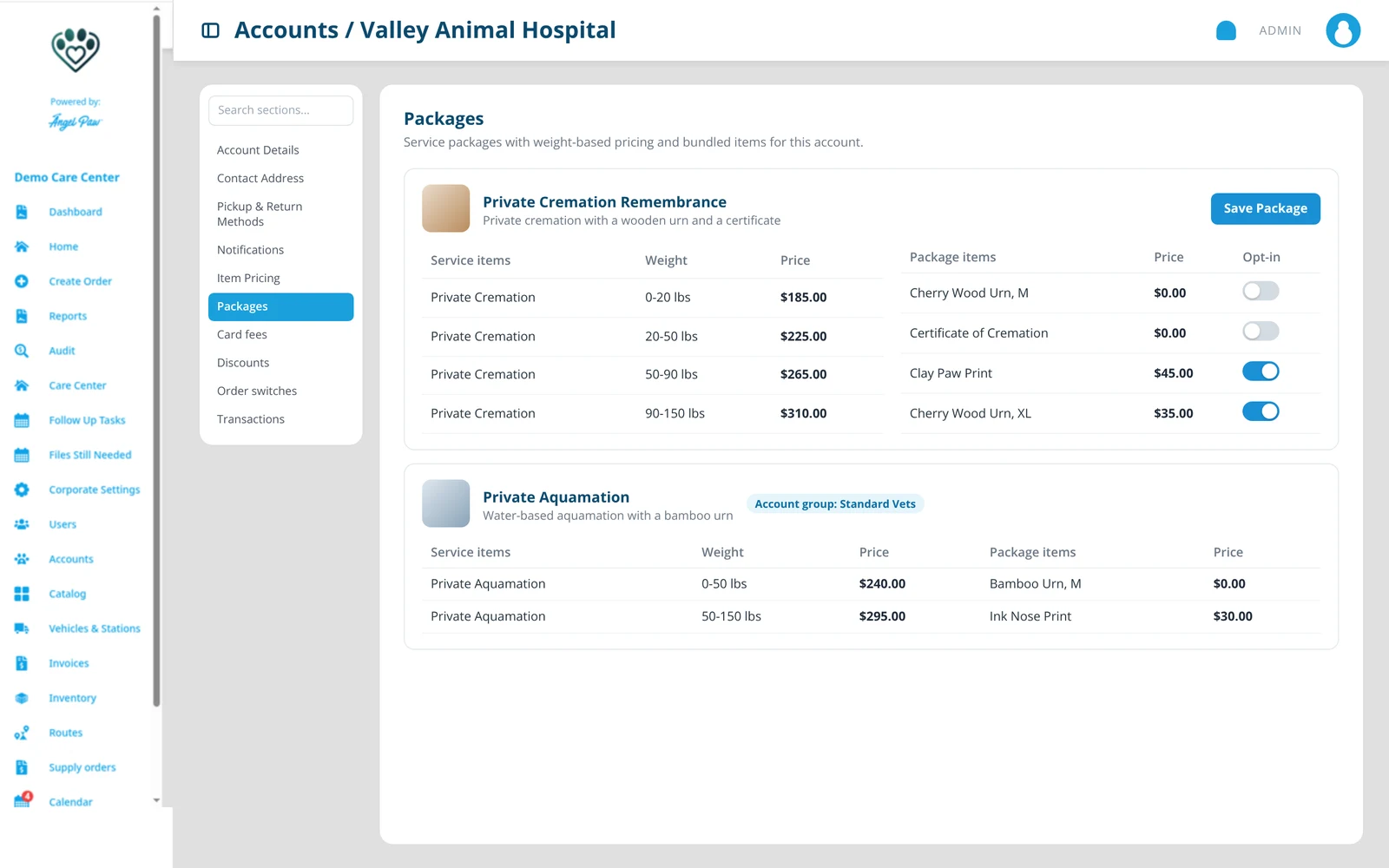
Illustrative mockup with fictional prices.
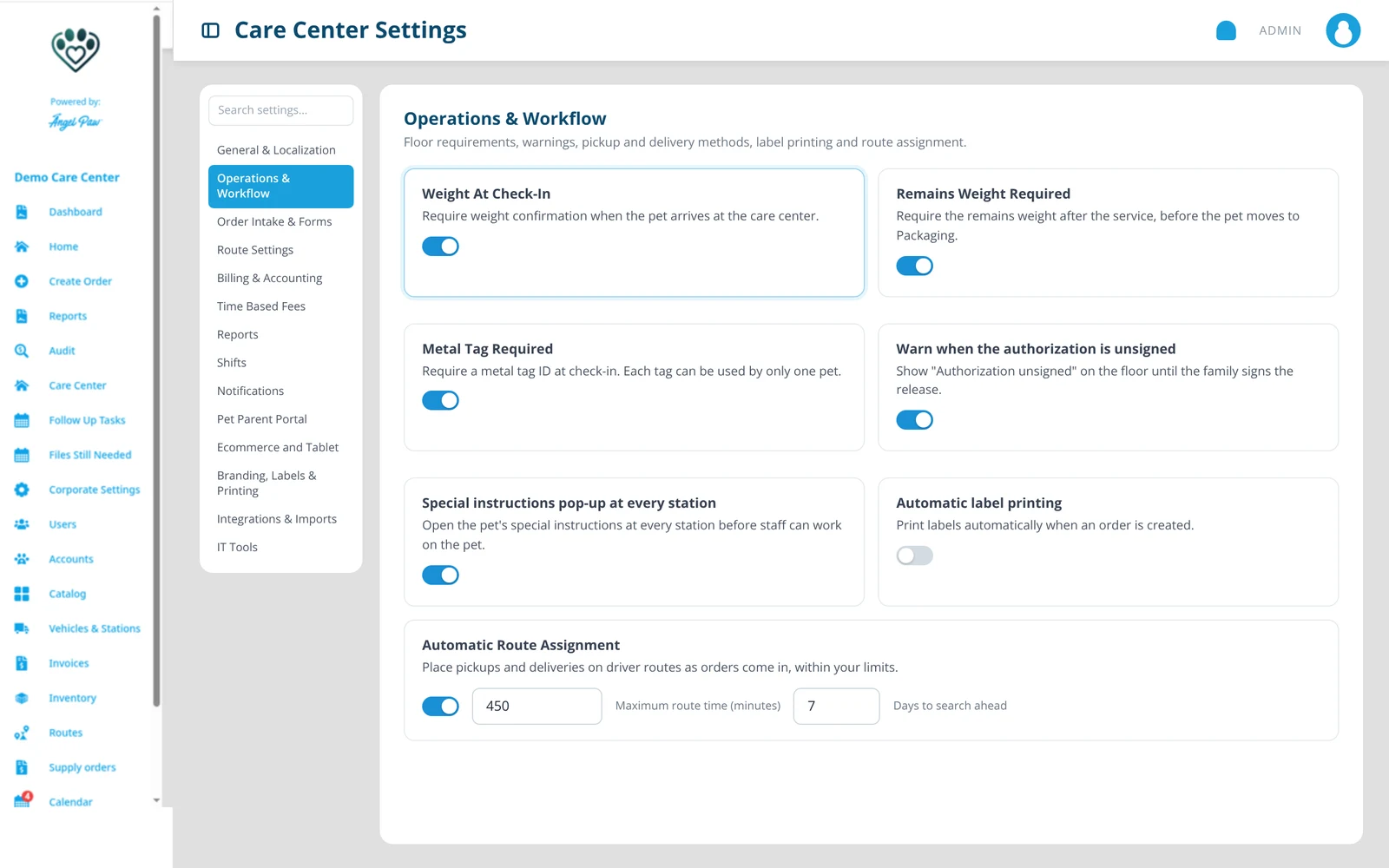
Illustrative mockup based on the Care Center Settings guide.
Your command center.
Settings are grouped into clear sections, from localization and floor requirements to notifications, the Pet Parent Portal, e-commerce, branding and labels, and integrations. Switches save immediately.
Everyone sees exactly what they need.
Care Center Manager
Runs the care center with the full menu: orders, floor, settings, users, accounts, catalog, routes and invoices.
Care Center Staff
The office role: Home, Create Order and Follow Up Tasks, plus extra tabs when you turn them on.
Floor roles
Machine Operator, Special Services and Packaging only see the Care Center Floor and their stations.
Field Service Representative
Drivers get a short menu and the Driver App for route pickups and returns.
Regional Manager
Oversees several care centers with reports, audit and corporate settings.
Vet roles
Account Manager and Account Staff create orders and follow them in the Veterinarian Portal.
The care center floor, in your pocket.
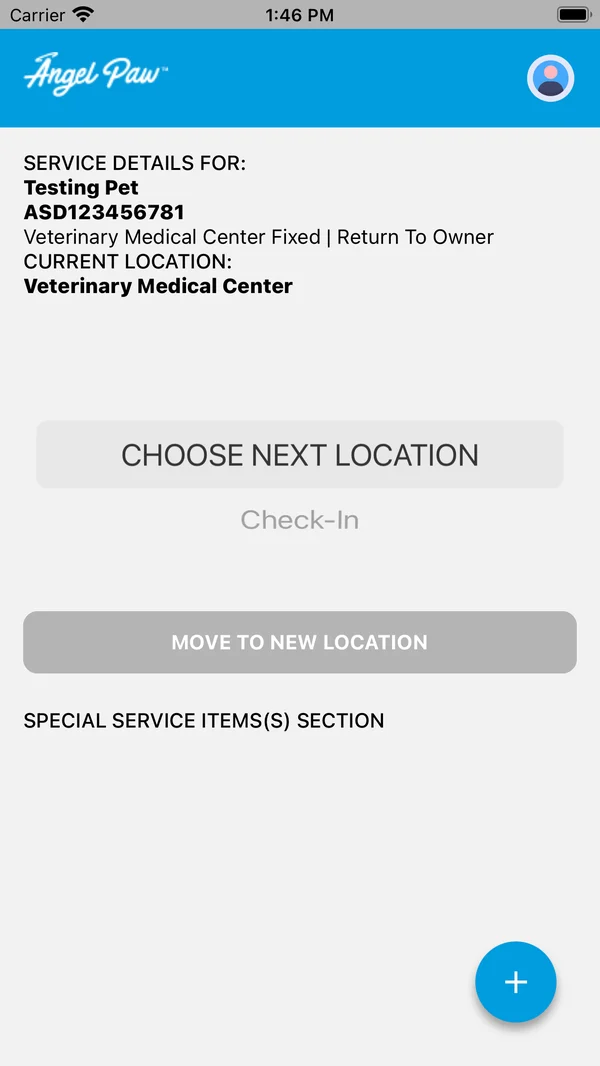
Operators and packaging staff carry the floor with them. The CareCenter Operator app for iOS and Android scans pets and items as they move between stations, opens a pet’s full order and records notes and photos straight into the pet file. It signs in with the same Angelpaw login as the web, and everything lands on the same orders the office sees.
Scan anything on the floor
Pet tags, metal tags, special-service barcodes, merchandise orders, inventory items and the printed station move codes.
Move pets between stations
See a pet’s service details and current location, choose the next station and move it. Every move is time-stamped under your name.
Clock in and out
Optional shift tracking: pick your shift, confirm acknowledgements, take breaks and lunch, clock out and check My Week.
Open the full order
From a pet’s tag, open the same order details the office sees, including special instructions and notes.
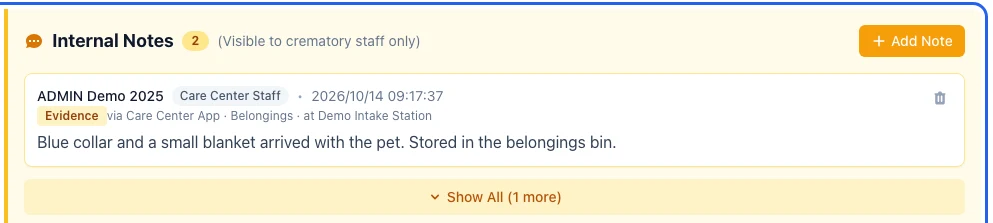
Take a photo. It is in the pet file.
Both the Operator app and the Driver App can take photos and attach them to the pet’s file as an evidence note: a collar and blanket that arrived with the pet, a re-tagged pet at intake, paperwork at pickup. The office sees them in View Order under Internal Notes and in Attachments, marked Evidence.
- Up to 5 photos per note
- Categories such as Belongings, Tag ID and Pet condition
- Internal only, never shown to clinics or families
- Location and camera details removed
- Recorded in the order’s activity history
Phone screens from the app store listings; the pet file view is a real Angelpaw screen from a demo care center.
Everything else your care center runs on.
Invoicing and payments
Individual or batch invoices to vets, payment links, receipts and refunds through your connected processor.
Routes, pickup and delivery
Pickups and deliveries placed on driver routes automatically, with geofences and limits you control.
Notifications
Automated email and SMS at each stage, plus WhatsApp, with wording you can edit.
Reporting
Revenue, volume, channel, item and top-seller reports, filterable by date range and account.
Accounting integrations
QuickBooks Online, Xero, NetSuite or Pennylane, depending on your setup.
E-commerce
Online ordering for pet parents through the Self-Service Portal, with card payment or save order.
Common questions
Does the portal work for aquamation?
Yes. Aquamation (water-based cremation, also called alkaline hydrolysis) is treated the same as cremation in Angelpaw.
Can I change the stations?
Yes. Stations are configured per care center in Vehicles & Stations. A typical flow runs from check-in through special services, cremation, post-service and packaging to staged for return and completed.
What hardware do I need?
A computer with a modern browser (Chrome recommended), a label printer such as Zebra for barcode and pet QR labels, an optional USB barcode scanner, and a phone or tablet for the Care Center app and the Driver App.
Can each vet partner have different prices?
Yes. Every account can have its own packages, item pricing, pickup and return methods, notifications, card fee setting and discounts. Account groups let several vets share one setup.
Which accounting systems are supported?
QuickBooks Online, Xero, NetSuite and Pennylane, depending on your account setup. Invoices and payments are sent to the accounting system.
Is the portal available outside the US?
Yes. Besides app.angelpaw.com there are portals for Europe and Australia, and weight, distance, date format and currency follow your care center settings.